Metropolis 主题
这个主题的灵感来自 Matthias Vogelgesang 创作的 Metropolis beamer 主题,由 Enivex 改造而来。
这个主题美观大方,很适合日常使用,并且你最好在电脑上安装 Fira Sans 和 Fira Math 字体,以取得最佳效果。
初始化
你可以通过下面的代码来初始化:
#import "@preview/touying:0.8.0": *
#import themes.metropolis: *

#import "@preview/numbly:0.1.0": numbly

#show: metropolis-theme.with(
  aspect-ratio: "16-9",
  footer: self => self.info.institution,
  config-info(
    title: [Title],
    subtitle: [Subtitle],
    author: [Authors],
    date: datetime.today(),
    institution: [Institution],
    contact: [contact\@mail.com],
    logo: emoji.city,
  ),
)

#set heading(numbering: numbly("{1}.", default: "1.1"))

#title-slide()
其中 metropolis-theme 接收参数:
aspect-ratio: 幻灯片的长宽比为 "16-9" 或 "4-3",默认为 "16-9"。align: 幻灯片的对齐方式,默认为horizon。header: 显示在页眉的内容,默认为self => utils.display-current-heading(setting: utils.fit-to-width.with(grow: false, 100%), depth: self.slide-level),也可以传入形如self => self.info.title的函数。header-right: 展示在页眉右侧的内容,默认为self => self.info.logo。footer: 展示在页脚的内容,默认为none,也可以传入形如self => self.info.author的函数。footer-right: 展示在页脚右侧的内容,默认为context utils.slide-counter.display() + " / " + utils.last-slide-number。footer-progress: 是否显示 slide 底部的进度条,默认为true。
并且 Metropolis 主题会提供一个 #alert[..] 函数,你可以通过 #show strong: alert 来使用 *alert text* 语法。
颜色主题
Metropolis 默认使用了
config-colors(
  primary: rgb("#eb811b"),
  primary-light: rgb("#d6c6b7"),
  secondary: rgb("#23373b"),
  neutral-lightest: rgb("#fafafa"),
  neutral-dark: rgb("#23373b"),
  neutral-darkest: rgb("#23373b"),
)
颜色主题,你可以通过 config-colors() 对其进行修改。
slide 函数族
Metropolis 主题提供了一系列自定义 slide 函数:
#title-slide(extra: none, ..args)
title-slide 会读取 self.info 里的信息用于显示,你也可以为其传入 extra 参数,显示额外的信息。
#slide(
  title: auto,
  align: auto,
  config: (:),
  repeat: auto,
  setting: body => body,
  composer: auto,
)[
  ...
]
默认拥有页眉和页脚的普通 slide 函数,其中 title 默认为 auto,即显示当前 slide-level 的标题;align 默认为 auto,即沿用主题的 align 参数(默认 horizon)。页脚只能在主题层通过 footer / footer-right 参数设置,#slide 本身没有 footer 参数。
#outline-slide(
  config: (:),
  level: auto,
  title: [Outline],
  spacing: 2em,
  ..args,
)
显示一个大纲页。level 默认为 auto,即使用 config-common 里配置的 slide-level;..args 会转发给 components.custom-progressive-outline,其中 indent、vspace、numbered、numbering 都已有符合 Metropolis 风格的默认值。
大纲页会用 place(hide(heading(..))) 放置一个不可见的标题,这样页眉和演讲者备注面板都能通过 utils.display-current-heading 取到这一页的标题。
#focus-slide[
  ...
]
用于引起观众的注意力。背景色为 self.colors.neutral-dark(Metropolis 并没有定义 primary-dark)。
#new-section-slide(config: (:), level: 1, numbered: true, body)
用给定标题开启一个新的 section。它已通过 config-common(new-section-slide-fn: ..) 注册,因此通常由 = 标题 自动触发,无需手动调用。
演讲者备注
Metropolis 定义了自己的 notes 函数,并通过 config-common(notes-fn: notes) 注册,因此第二屏幕和 only-notes 视图中的备注面板会沿用主题的配色。它建立在 touying-notes 之上,你也可以传入自己的实现来覆盖它:
#show: metropolis-theme.with(
  config-common(notes-fn: my-notes),
)
详见演讲者备注。
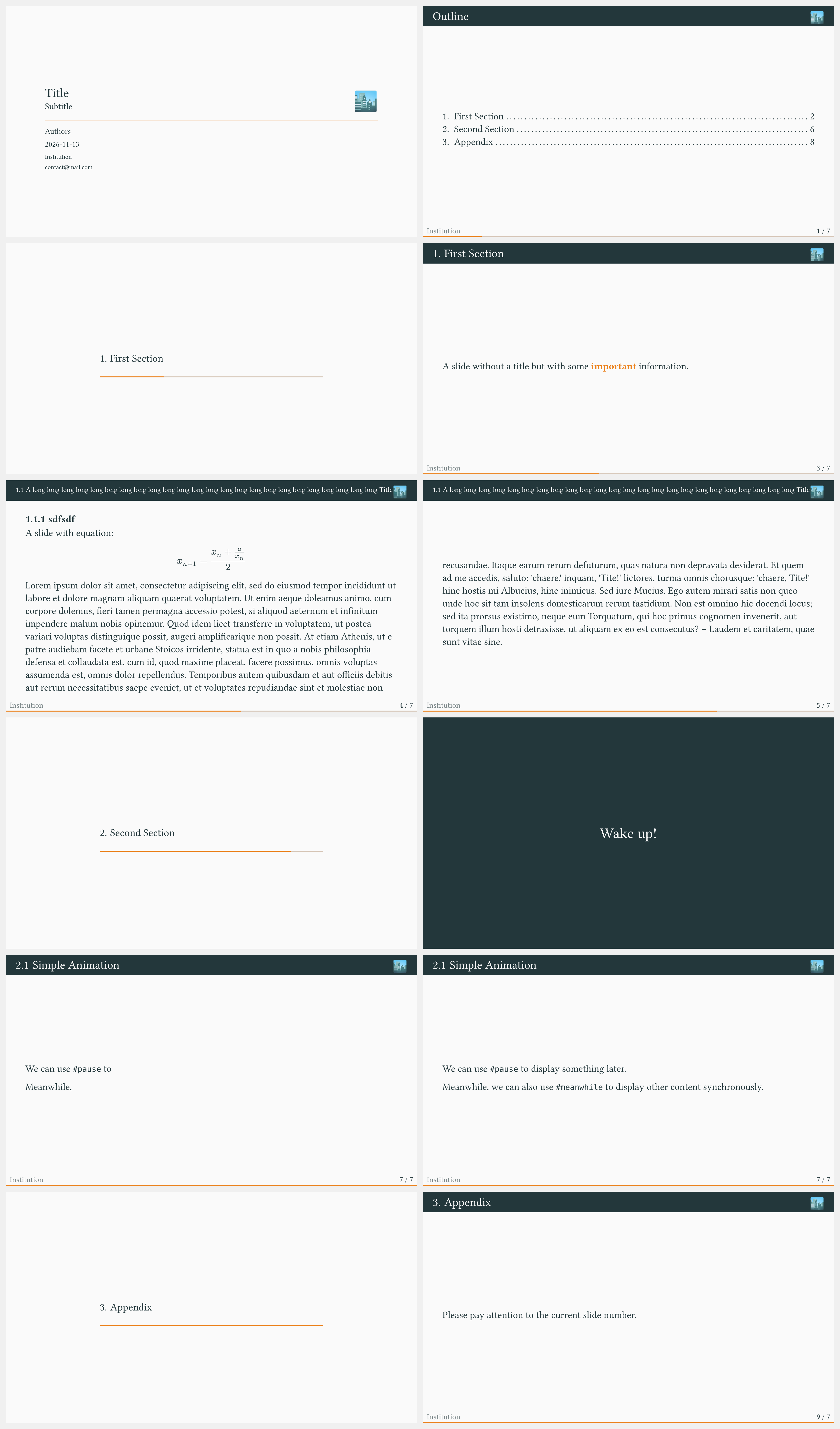
示例
#import "@preview/touying:0.8.0": *
#import themes.metropolis: *

#import "@preview/numbly:0.1.0": numbly

#show: metropolis-theme.with(
  aspect-ratio: "16-9",
  footer: self => self.info.institution,
  config-info(
    title: [Title],
    subtitle: [Subtitle],
    author: [Authors],
    date: datetime.today(),
    institution: [Institution],
    contact: [contact\@mail.com],
    logo: emoji.city,
  ),
)

#set heading(numbering: numbly("{1}.", default: "1.1"))

#title-slide()

= Outline <touying:hidden>

#outline(title: none, indent: 1em, depth: 1)

= First Section

---

A slide without a title but with some *important* information.

== A long long long long long long long long long long long long long long long long long long long long long long long long Title

=== sdfsdf

A slide with equation:

$ x_(n+1) = (x_n + a/x_n) / 2 $

#lorem(200)

= Second Section

#focus-slide[
  Wake up!
]

== Simple Animation

We can use `#pause` to #pause display something later.

#meanwhile

Meanwhile, #pause we can also use `#meanwhile` to display other content synchronously.

#speaker-note[
  + This is a speaker note.
  + You won't see it unless you use `config-common(show-notes-on-second-screen: right)`
]

#show: appendix

= Appendix

---

Please pay attention to the current slide number.