全局设置
全局样式
对 Touying 而言,全局样式即为需要应用到所有地方的 set rules 或 show rules,例如 #set text(size: 20pt)。
其中,Touying 的主题会封装一些自己的全局样式,他们会被放在 #self.methods.init 中,例如 simple 主题就封装了:
config-methods(
  init: (self: none, body) => {
    set text(fill: self.colors.neutral-darkest, size: 25pt)
    show footnote.entry: set text(size: .6em)
    show strong: self.methods.alert.with(self: self)
    show heading.where(level: self.slide-level + 1): set text(1.4em)

    body
  },
)
如果你并非一个主题制作者,而只是想给你的 slides 添加一些自己的全局样式,你可以简单地将它们放在 #show: xxx-theme.with() 之前或之后。例如 metropolis 主题就推荐你自行加入以下全局样式:
#set text(font: "Fira Sans", weight: "light", size: 20pt)
#show math.equation: set text(font: "Fira Math")
#set strong(delta: 100)
#set par(justify: true)
全局信息
就像 Beamer 一样,Touying 通过统一 API 设计,能够帮助您更好地维护全局信息,让您可以方便地在不同的主题之间切换,全局信息就是一个很典型的例子。
你可以通过
config-info(
  title: [Title],
  subtitle: [Subtitle],
  author: [Authors],
  date: datetime.today(),
  institution: [Institution],
  contact: [contact\@mail.com],
  logo: [logo.png],
  extra: (supervisor:[Supervisor],),
)
你甚至可以传入额外信息,以维护其他属性未涵盖的演示文稿信息。
在后续,你就可以通过 self.info 这样的方式访问它们。
这些信息一般会在主题的 title-slide、header 和 footer 被使用到,例如 #show: metropolis-theme.with(aspect-ratio: "16-9", footer: self => self.info.institution)。
其中 date 可以接收 datetime 格式和 content 格式,并且 datetime 格式的日期显示格式,可以通过
config-common(datetime-format: "[year]-[month]-[day]")
的方式更改。
前言(Preamble)
config-common(preamble: ...) 选项允许你在每张幻灯片上执行初始化代码,而无需手动重复。这在集成 codly 等包时非常有用:
#show: simple-theme.with(
  config-common(preamble: {
    codly(languages: codly-languages)
  }),
)
你也可以针对单张幻灯片局部设置此选项,详见下文。
全局配置覆盖(Show-Rule)
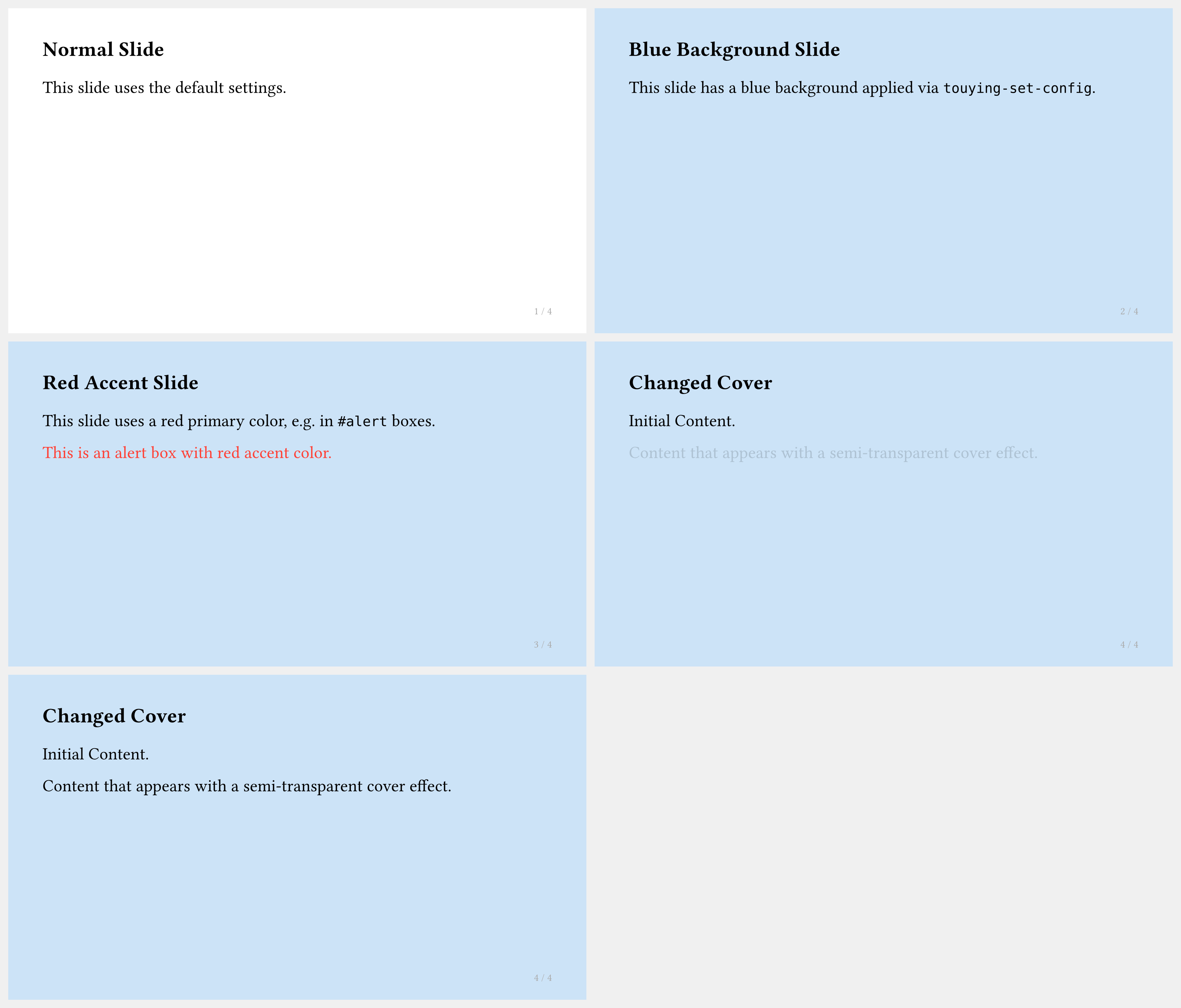
你可以使用 #show: touying-set-config.with(...) 覆盖当前及其后所有幻灯片的任意配置,用法与普通的 show/set 规则相同:
#import "@preview/touying:0.7.4": *
#import themes.simple: *

#show: simple-theme.with(aspect-ratio: "16-9")

== Normal Slide

This slide uses the default settings.


== Blue Background Slide
#show: touying-set-config.with(config-page(fill: blue.lighten(80%)))
This slide has a blue background applied via `touying-set-config`.

== Red Accent Slide
#show: touying-set-config.with(config-colors(primary: red))
This slide uses a red primary color, e.g. in `#alert` boxes.

#alert[This is an alert box with red accent color.]

== Changed Cover
#show: touying-set-config.with(config-methods(
  cover: utils.semi-transparent-cover,
))
Initial Content.

#pause

Content that appears with a semi-transparent cover effect.
局部配置覆盖
如果你只想影响某一张幻灯片,可以通过 #slide(config: ...)[...] 局部设置配置:
== Local Config
#slide(config:config-page(fill: purple.lighten(90%)))[
Only this slide has a light purple background, but the next slide goes back being light blue.
]
延迟配置(Deferred Config Show Rules)
你也可以将配置变更推迟到下一张幻灯片开始时生效。show: appendix 正是通过此机制实现的,同样适用于需要在幻灯片内容之外生效的自定义前言等场景。(注意 config-common 在此处无效,你也可以不使用它直接书写配置。)
== Content Slide
Some content.
#show: touying-set-config.with(defer:true, config-common(appendix:true))
// you can just write `show: appendix`
== Appendix
Page counter does no longer increase.
#show: touying-set-config.with(defer:true, (preamble:{codly(languages: codly-languages)}))
== Deferred Config Change
Now we have codly available.
冻结计数器
在使用动画时,单张幻灯片内的图表和定理计数器默认会随每个子幻灯片递增。若要冻结某个计数器(使其在子幻灯片之间保持不变),请使用:
config-common(frozen-counters: (counter(figure.where(kind: image)),))
对于自定义 figure kind,请传入 counter(figure.where(kind: "Name")),而不是 selector 本身;frozen-counters 需要的是 counter。在使用 Theorion 包时这也尤为有用:
config-common(frozen-counters: (theorem-counter,))
访问配置信息
你可以使用 touying-get-config 访问幻灯片的已存储配置。该配置为全局配置与该幻灯片所有覆盖设置的综合结果。
请注意,它在 context 时机求值,并在你请求的位置插入到文档流中,因此只能以内容(content)形式使用。
查询完整配置
不传参数调用 touying-get-config() 可以获取完整的配置字典,然后通过普通的字典语法访问嵌套值:
#touying-get-config().info.author

#touying-get-config().common.handout
由于 common 下的字段是注册在了顶层,你可以直接访问:
#touying-get-config().handout // 等同于 .common.handout
通过 key 查询
传入以点号分隔的字符串 key,可以直接获取特定的子配置或值:
#touying-get-config("info.author")

#touying-get-config("info")  // 返回整个 info 子字典
默认值
如果 key 不存在,touying-get-config 默认会 panic。如果你希望提供一个回退值,可以使用 default 参数:
#touying-get-config("random.dict.value", default: "default value")
访问自定义配置
通过 touying-set-config 设置的自定义 key,在 show 规则之后即可访问:
#show: touying-set-config.with((random: (dict: (value: 123))))

#touying-get-config("random.dict.value")  // 显示 "123"
访问自定义配置时,必须使用字符串 key 形式(touying-get-config("random.dict.value")),而不是链式字典访问(touying-get-config("random.dict").value),因为后者会尝试在 content 元素上访问 .value,这会导致失败。