复杂动画
得益于 Polylux 提供的语法,我们同样能够在 Touying 中使用 only、uncover 和 alternatives。
标记风格的函数
我们可以使用标记风格的函数,用起来十分方便。
At subslide #touying-fn-wrapper((self: none) => str(self.subslide)), we can

use #uncover("2-")[`#uncover` function] for reserving space,

use #only("2-")[`#only` function] for not reserving space,

#alternatives[call `#only` multiple times \u{2717}][use `#alternatives` function #sym.checkmark] for choosing one of the alternatives.
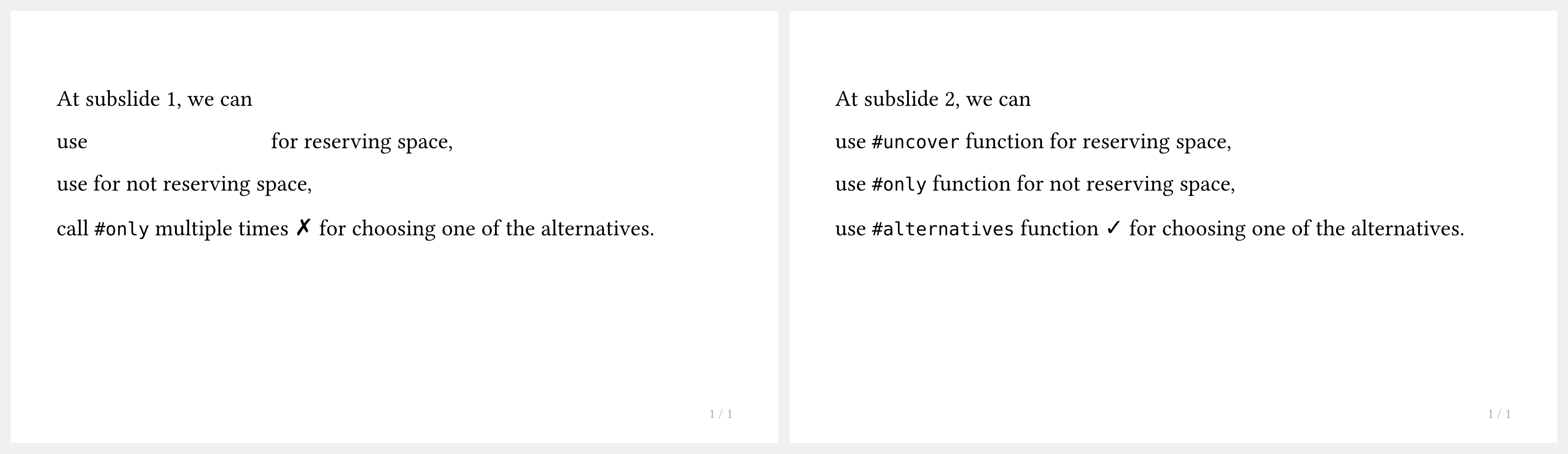
但是这种方式并非在所有情况下都能生效,例如你将 uncover 放入 context 表达式中,就会报错。
回调风格的函数
为了避免上文提到的布局函数的限制,Touying 利用回调函数巧妙实现了总是能生效的 only、uncover 和 alternatives,具体来说,您要这样引入这三个函数:
#slide(repeat: 3, self => [
  #let (uncover, only, alternatives) = utils.methods(self)

  At subslide #self.subslide, we can

  use #uncover("2-")[`#uncover` function] for reserving space,

  use #only("2-")[`#only` function] for not reserving space,

  #alternatives[call `#only` multiple times \u{2717}][use `#alternatives` function #sym.checkmark] for choosing one of the alternatives.
])
注意到了吗?我们不再是传入一个内容块,而是传入了一个参数为 self 的回调函数,随后我们通过
#let (uncover, only, alternatives) = utils.methods(self)
从 self 中取出了 only、uncover 和 alternatives 这三个函数,并在后续调用它们。
这里还有一些有趣的事实,例如 int 类型的 self.subslide 指示了当前 subslide 索引,而实际上 only、uncover 和 alternatives 函数也正是依赖 self.subslide 实现的获取当前 subslide 索引。
我们手动指定了参数 repeat: 3,这代表着显示 3 张 subslides,我们需要手动指定是因为 Touying 无法探知回调风格 only、uncover 和 alternatives 需要显示多少张 subslides。
only
only 函数表示只在选定的 subslides 中「出现」,如果不出现,则会完全消失,也不会占据任何空间。也即 #only(index, body) 要么为 body 要么为 none。
其中 index 可以是 int 类型,也可以是 "2-" 或 "2-3" 这样的 str 类型,更多用法可以参考 Polylux。
为方便使用,我们还支持 auto,它使用遇到 only 时的当前 subslide 位置;"h" 也是如此,但它是字符串,以及其派生形式:"h-" 和 "-h"。
此外,我们还允许通过 "!" 进行反转。只需写 "!h" 或 "!2-4" 即可获取除这些 subslides 外的所有 subslides。与正常索引相反,反转不会增加 subslide 计数。
关于如何使用路标,请参阅关于路标的专门章节。
uncover
uncover 函数表示只在选定的 subslides 中「显示」,否则会被 cover 函数遮挡,但仍会占据原有。也即 #uncover(index, body) 要么为 body 要么为 cover(body)。
其中 index 可以是 int 类型,也可以是 "2-" 或 "2-3" 这样的 str 类型,更多用法可以参考 Polylux。
但您也可以使用上面为 only 展示的其他选项。
您应该也注意到了,事实上 #pause 也使用了 cover 函数,只是提供了更便利的写法,实际上它们的效果基本上是一致的。
alternatives
alternatives 函数表示在不同的 subslides 中展示一系列不同的内容,例如
#slide(repeat: 3, self => [
  #let (uncover, only, alternatives) = utils.methods(self)

  #alternatives[Ann][Bob][Christopher]
  likes
  #alternatives[chocolate][strawberry][vanilla]
  ice cream.
])
如你所见,alternatives 能够自动撑开到最合适的宽度和高度,这是 only 和 uncover 所没有的能力。事实上 alternatives 还有着其他参数,例如 start: 2、repeat-last: true 和 position: center + horizon 等,更多用法可以参考 Polylux。